Turning any app event into a text, no code
Zapier SMS automation lets you trigger a text message from an event in almost any app (a new form entry, a CRM deal moving stage, a calendar event, or an order) without writing code. According to Zapier, it connects to 6,000+ business apps (Zapier integrations page, 2025). The pattern is: pick a trigger (the event that starts the workflow) in one app, and an action (send an SMS) in your messaging platform, and Zapier wires them together. For teams without developers, or for quick automations not worth a code project, it's genuinely powerful. Critical information routes straight to a phone, and subscribers or teammates never miss an update.
It's also not always the right tool. This guide covers how it works, the workflows it's great for, and the honest line where a direct API beats no-code.
How a Zap works: trigger and action
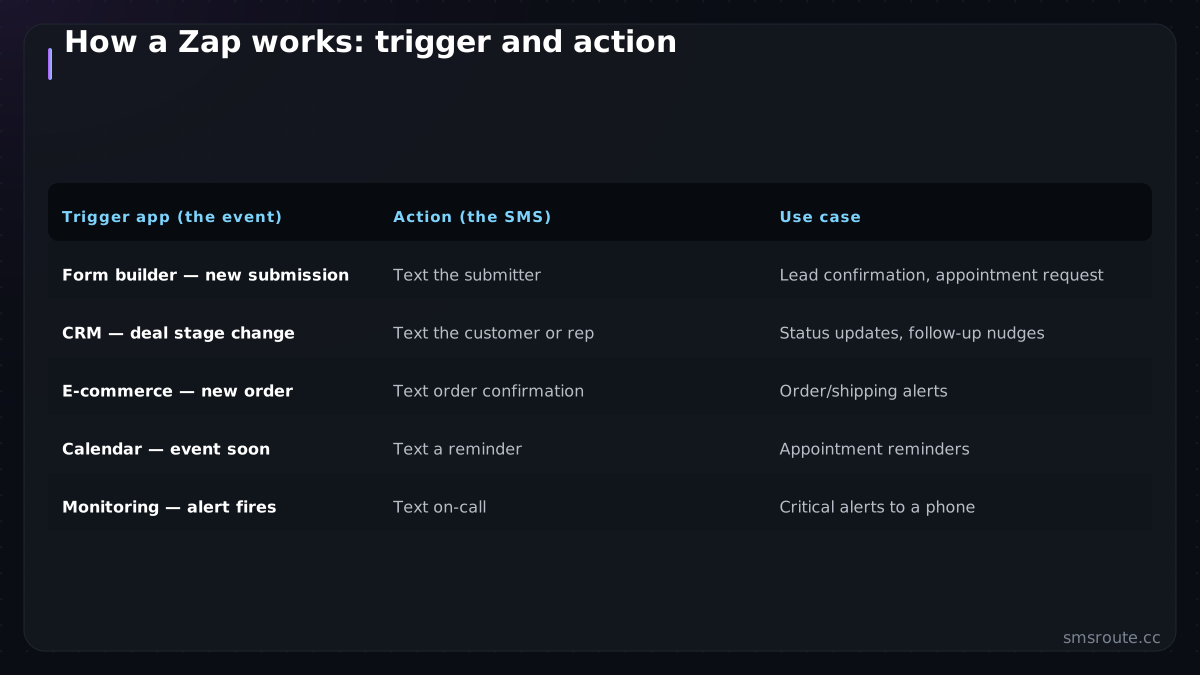
Every Zap (Zapier's word for an automated workflow) pairs a trigger with one or more actions. The trigger is the event that starts it; the action is what happens next.
| Trigger app (the event) | Action (the SMS) | Use case |
|---|---|---|
| Form builder — new submission | Text the submitter | Lead confirmation, appointment request |
| CRM — deal stage change | Text the customer or rep | Status updates, follow-up nudges |
| E-commerce — new order | Text order confirmation | Order/shipping alerts |
| Calendar — event soon | Text a reminder | Appointment reminders |
| Monitoring — alert fires | Text on-call | Critical alerts to a phone |
You connect your SMS platform as the action app, map the fields (which number to text, what content, pulling in data from the trigger), and turn it on. From then, every matching event fires a text automatically. No server, no code, no deployment. That is exactly the appeal for the workflows it fits.
When no-code is right — and when it isn't
- No-code wins for glue — connecting a handful of events across SaaS apps you don't control, where the value is speed and no maintenance. A form-to-text or CRM-to-text automation is perfect Zapier territory.
- No-code wins for non-developers — if there's no engineer to build an integration, Zapier turns a workflow into a configuration task anyone can do.
- Direct API wins at volume — Zapier prices per task (workflow run), so high-volume messaging gets expensive fast; a direct API integration is far cheaper per message at scale.
- Direct API wins for control — retries, idempotency, delivery reconciliation, and custom logic need code; no-code abstracts those away, which is convenient until you need them.
- Consider Make for complex/cheap — Make prices per operation rather than per task, so complex multi-step workflows cost less than the Zapier equivalent.
The rule of thumb: Zapier for low-volume glue between apps you don't own, direct API for high-volume or logic-heavy sending you control. Many teams use both — Zapier for a few cross-app automations, a direct API for their core transactional traffic.
Connecting an SMS API through Zapier
Even with a direct SMS API, you can use Zapier as the trigger layer: a Zap catches the app event and calls your SMS API via a webhook action, giving you no-code triggering with your own API's cost and control on the sending side. That hybrid — Zapier for the trigger, your API for the send — is often the sweet spot, keeping the easy event-wiring no-code while the actual messaging runs on infrastructure you control.
SMSRoute is an SMS API with crypto billing (BTC, ETH, USDT, XMR, LTC, and SOL) that does not require KYC for standard usage (smsroute.cc, 2026). The honest framing: we're the SMS API, not a Zapier-native app tile — you connect us through Zapier's webhook action (the Zap's trigger fires, and the webhook POSTs to our send endpoint), or skip Zapier and call the API directly for volume traffic. Use Zapier when the win is no-code event-wiring across SaaS tools; use the API directly when volume, cost, or control matter. And when you outgrow per-task pricing, moving the sending from a Zapier action to a direct API call is the natural next step — same messages, a fraction of the cost. For reference, SMSRoute's published route pages list delivery from $0.004/message (premium direct-carrier corridors up to $0.035) with sub-100ms median submission and ~98.6% delivered success (smsroute.cc route pages, 2026). It accepts Bitcoin, Ethereum, and USDT, with a minimum transaction amount of $10 worth of the selected token. Delivery success is measured by carrier delivery receipts, not just submission acknowledgments. The remaining 1.4% typically fails due to invalid numbers, network outages, or carrier filtering.
curl -X POST https://api.smsroute.cc/sms/send \
  -H "Authorization: Bearer YOUR_API_KEY" \
  -H "Content-Type: application/json" \
  -d '{"to": "+1234567890", "from": "MyApp", "message": "Your order has shipped!"}'
Related on SMSRoute: for specific no-code destinations, see SMS from Google Sheets and SMS alerts to Slack.
Comparison: Zapier vs Make vs Direct API
| Factor | Zapier | Make | Direct API |
|---|---|---|---|
| Pricing model | Per task (e.g., $19.99/mo for 750 tasks) | Per operation (e.g., $9/mo for 10,000 ops) | Per message (e.g., $0.035/msg via SMSRoute) |
| App integrations | 6,000+ | 1,500+ | None (custom code) |
| Best for | Simple, low-volume glue across many apps | Complex multi-step workflows on a budget | High-volume, control, custom logic |
| Learning curve | Low | Medium | High (developer needed) |
Related reading
FAQ
How do I send SMS with Zapier?
When should I use Zapier for SMS versus a direct API?
Is Zapier or Make better for SMS automation?
Can I connect a custom SMS API to Zapier?
Send your first SMS in 5 minutes
No KYC. Pay with BTC, ETH, USDT, XMR, LTC, and SOL. Live routes to 149 countries.
Get an API key →