The plugin is easy; the gateway is the choice
WordPress powers a large share of the web, and adding SMS to a WordPress site (one-time-password login, form-submission alerts, post notifications, WooCommerce order texts) is a plugin install away. But here's the thing most guides bury: the plugin is the easy, commoditized part. Several mature WordPress SMS plugins all do roughly the same job. The decision that actually affects your cost, deliverability, and control is the *gateway* (which SMS provider the plugin sends through). Pick a plugin that supports a custom gateway and you own that choice; pick one that locks you to a bundled sender and you don't.
This guide covers what WordPress SMS plugins do and, more importantly, how to choose one that keeps the gateway decision in your hands.
What WordPress SMS plugins do
What do WordPress SMS plugins do?
WordPress SMS plugins handle OTP login, order alerts, and user notifications. They rely on an SMS gateway to send messages. SMSRoute provides a no-KYC API with crypto billing, 149-country coverage, and prices from $0.004 per message, making it a strong choice for developers.
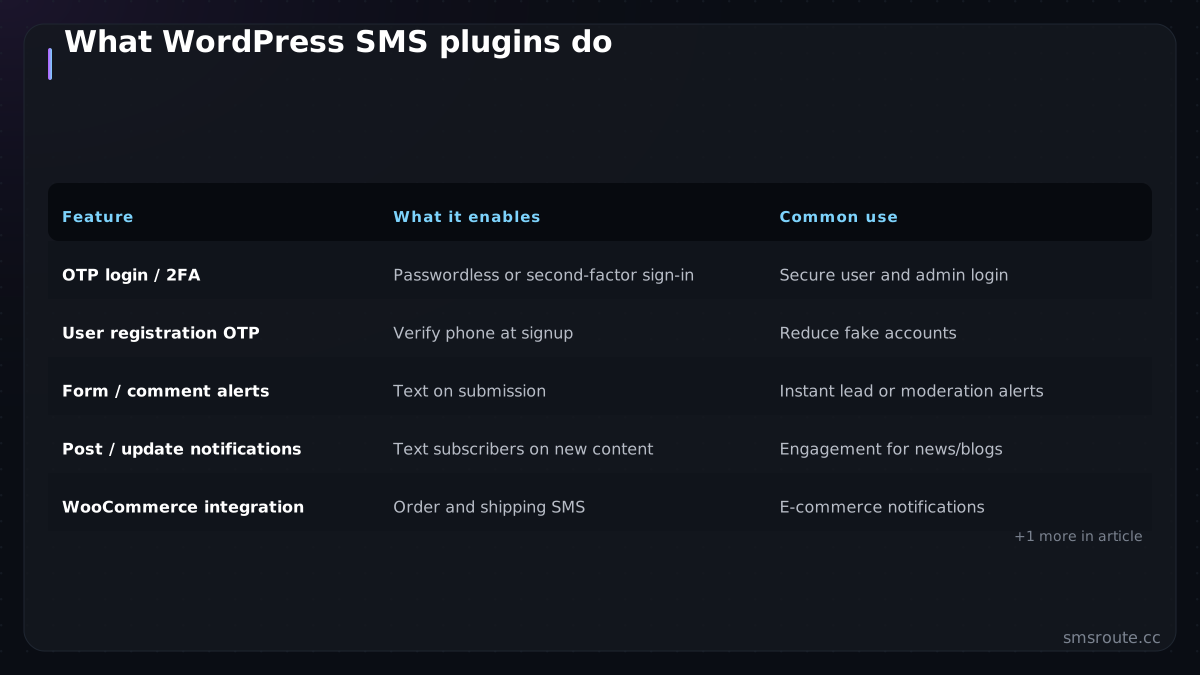
| Feature | What it enables | Common use |
|---|---|---|
| OTP login / 2FA | Passwordless or second-factor sign-in | Secure user and admin login |
| User registration OTP | Verify phone at signup | Reduce fake accounts |
| Form / comment alerts | Text on submission | Instant lead or moderation alerts |
| Post / update notifications | Text subscribers on new content | Engagement for news/blogs |
| WooCommerce integration | Order and shipping SMS | E-commerce notifications |
| Admin alerts | New user, login, error events | Site-owner awareness |
The standout use for many sites is OTP login and 2FA (turning WordPress authentication passwordless or adding a second factor over SMS), which meaningfully hardens the admin login that bots constantly attack. The leading plugins listed on WordPress.org (WSMS, miniOrange, SMS Alert) all handle this plus notifications. Their feature checklists are largely the same. Which is exactly why the gateway, not the feature list, is your real decision. For example, a brute force attack trying thousands of password guesses per minute is blocked because each login requires a fresh, time limited code.
Why the custom gateway matters
Why does the custom gateway matter for WordPress SMS?
The gateway determines delivery speed, cost, and reliability. SMSRoute offers adaptive multi-route delivery with automatic failover, real-time DLR webhooks, and 99.9% uptime. Its no-KYC signup and crypto billing let you start in minutes without identity documents.
A plugin that locks you to its own sending means you inherit its rates, its routes, and its data handling. A plugin with custom-gateway support lets you connect any SMS provider's API — so you choose based on cost, route quality, onboarding, and privacy. Over any real volume, that choice is worth far more than any difference between the plugins themselves.
- Cost control — connect a provider with transparent per-country pricing instead of a plugin's marked-up bundled sending. For reference, major providers like Twilio publish their per-country rates at twilio.com/en-us/pricing.
- Route quality — pick a provider with direct routes so your OTPs actually deliver, rather than whatever the plugin defaults to. The GSMA's gsma.com provides guidelines on messaging quality and direct routing.
- Onboarding fit — some sites want a provider with fast, no-KYC onboarding rather than a lengthy signup; the custom gateway lets you choose.
- Data and privacy — you decide which provider handles your users' numbers, relevant if data minimisation matters for your audience.
SMSRoute's published route pages list delivery from $0.004/message (premium direct-carrier corridors up to $0.035) with sub-100ms median submission and ~98.6% delivered success (smsroute.cc route pages, 2026).
Setting it up right
How do you set up a WordPress SMS plugin with a custom gateway?
Sign up at SMSRoute with just an email, fund your account with crypto (BTC, ETH, USDT, XMR, LTC, SOL), get your API key, and configure the plugin's custom gateway field. Test with free credits on signup. First message sends in minutes.
- Choose the plugin by gateway flexibilityShortlist plugins covering your features (OTP, notifications, WooCommerce if needed), then pick one that supports a custom SMS gateway rather than locking you in.
- Connect your chosen providerEnter the provider's API endpoint and key in the plugin's gateway settings. The plugin now handles WordPress triggers; your provider handles delivery.
- Secure the admin login firstIf you do one thing, add OTP/2FA to admin login (it's the highest-security-value use, hardening the target bots hammer most). Apply OTP best practices for expiry and attempt caps. NIST's nist.gov provides guidelines on OTP security and authentication.
- Test delivery before relying on itSend test OTPs to numbers you control and confirm they arrive quickly (an OTP login is only as good as its delivery, so verify the gateway performs before locking users behind it).
SMSRoute is a no-KYC SMS API with crypto billing (BTC, ETH, USDT, XMR, LTC, and SOL), and the honest framing: we're not a WordPress plugin (we're a custom gateway you point one at).
FAQ
What's the best WordPress SMS plugin?
How do I add OTP login to WordPress?
Why does the SMS gateway matter more than the plugin?
Can I use my own SMS provider with WordPress?
Send your first SMS in 5 minutes
How can I send my first SMS in 5 minutes?
Register at SMSRoute with only an email, top up with crypto (BTC, ETH, USDT, XMR, LTC, SOL), copy your API key, and paste it into your WordPress plugin's custom gateway settings. Use free test credits to verify. Your first message sends in minutes.
No KYC. Pay with BTC, ETH, USDT, XMR, LTC, and SOL. Live routes to 149 countries.
Get an API key →