
How Does the WebOTP API Work for SMS Autofill?
navigator.credentials.get() and fills the OTP input with one tap. Safari
on iOS reads the same message format for native QuickType autofill above the keyboard.The WebOTP API extends the Credential Management API. Your page calls
navigator.credentials.get() with an otp transport request, the browser watches for a
specially formatted SMS, and the code arrives in your JavaScript after one user tap. But the mechanism is in the
message format — and it includes a security property that standard OTP delivery lacks.
Every OTP message must end with a specific machine-readable line:
Your MyApp code is 481902.

@myapp.com #481902
That last line is the whole trick. @domain names the origin allowed to receive the code;
#code carries the value. Human-readable text goes above it; the machine line goes last on its own
line with no trailing characters. Per MDN's WebOTP API documentation, the
code is origin-bound, so a phishing page on the wrong domain cannot harvest it via autofill — a meaningful
mitigation for credential harvesting attacks that works silently for every user.
The format is defined in the WebOTP specification and supported across major browsers. When combined with an SMS provider that offers reliable delivery, WebOTP autofill creates a login experience that is both faster and more secure than traditional copy-paste OTP flows.
Which Browsers Support the WebOTP API for SMS Autofill in 2026?
autocomplete="one-time-code". Firefox has no support. Always pair WebOTP with
a manual entry fallback for cross-browser compatibility.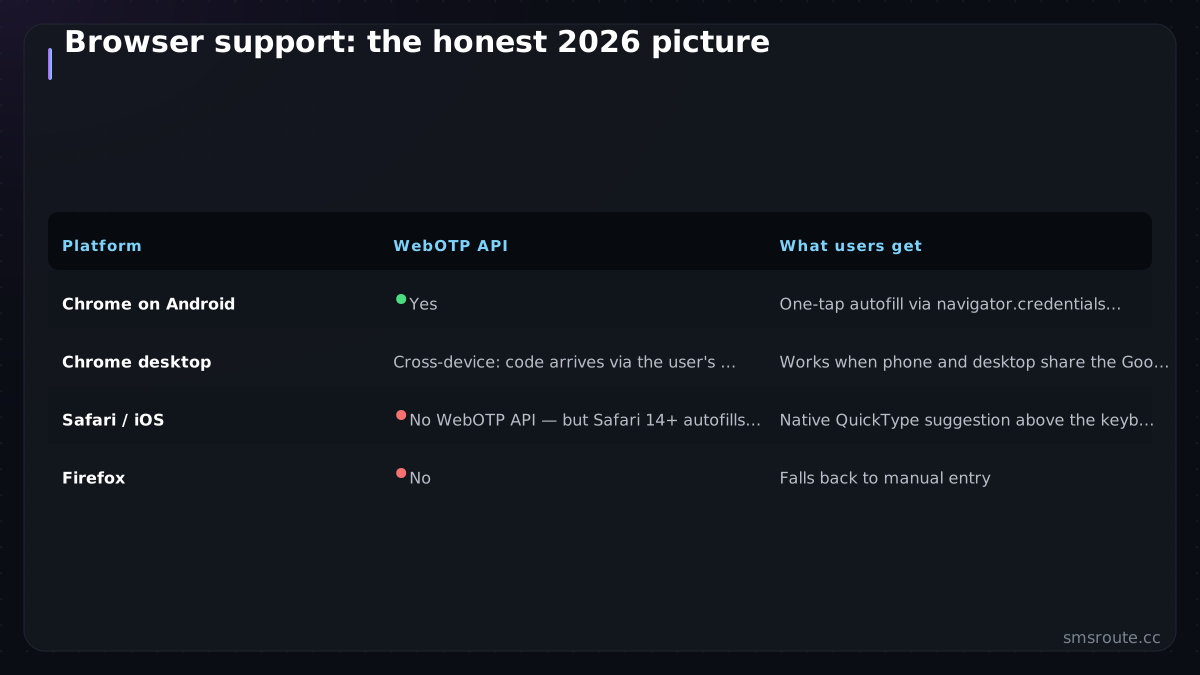
| Platform | WebOTP API | What users get |
|---|---|---|
| Chrome on Android | Yes | One-tap autofill via navigator.credentials.get() |
| Chrome desktop | Cross-device | Code arrives via the user's Android phone (same Google account) |
| Safari / iOS | No WebOTP API | Native QuickType suggestion above the keyboard via autocomplete="one-time-code" |
| Firefox | No | Falls back to manual entry |
Apple's autofill reads the same origin-bound line, and the autocomplete="one-time-code" input
attribute triggers iOS suggestions on any properly formatted message. You implement once — in the message
template and the form field — and every supported platform improves.
Per Chrome's developer guidance, always
add autocomplete="one-time-code" to the OTP input even when using the WebOTP API. It is the
cross-browser signal that tells the keyboard to show the autofill suggestion and works without the JavaScript
API. The WebOTP API is available in Chrome 84 and later.
How to Implement the WebOTP API for SMS Autofill
autocomplete="one-time-code", and call
navigator.credentials.get() with feature detection. SMSRoute's SMS API lets
you send these formatted messages to 149 countries with crypto billing and no KYC.- Format the SMS server-sideMessage text first, then a blank line, then
@yourdomain.com #123456. The domain must exactly match the page origin — subdomains count as different origins for security binding. Send it like any OTP via the SMSRoute HTTP API and the formatted message travels unchanged through direct carrier connections. - Mark up the
input
<input autocomplete="one-time-code" inputmode="numeric" pattern="[0-9]*">— this attribute alone triggers iOS autofill without the WebOTP API. It also tells Android keyboards to show the numeric layout. - Add the WebOTP API call for ChromeCall
navigator.credentials.get({otp: {transport: ['sms']}, signal})when the form renders. On resolve, fill the input and submit the form. Wrap in feature detection ('OTPCredential' in window) and always keep manual entry working as a fallback for unsupported browsers. - Abort on manual submitPass an
AbortControllersignal and cancel the credentials request if the user types the code manually — otherwise the browser prompt can appear after the user has already submitted the form, causing confusion.
Total implementation cost: one line in the message template, two attributes on the input, and roughly fifteen lines of feature-detected JavaScript. Against that investment, OTP autofill measurably reduces login abandonment — every second saved in the authentication flow improves conversion rates for OTP-dependent products.
Common OTP Autofill Pitfalls and Fixes
autocomplete attribute, or
multi-segment message splitting. Fix these four issues and autofill works across nearly every modern browser.
- Origin must match exactly.
@app.example.comwill not autofill onexample.com. Cross-origin iframes need both origins annotated in the message plus a permissions-policy grant on the parent page. - One code per message. Autofill extractors pick the wrong value from messages containing multiple codes. Send exactly one OTP code per SMS for reliable parsing across all platforms.
- Stay within one SMS segment. The machine line adds roughly 20 characters. Budget your human-readable text so the whole message stays under 160 GSM-7 characters, or the carrier splits it into two segments which can break autofill parsing. See our SMS pricing page for per-segment rates across all countries.
- The format line must be last. Any text after
@domain #codebreaks parsing. No trailing spaces, no signature line, no footer text. - iOS does not use the WebOTP API. Safari relies entirely on the formatted message plus
autocomplete="one-time-code"on the input. Test autofill on both Android and iOS separately since the underlying mechanics are completely different.
Why SMS Delivery Reliability Matters for OTP Success
We maintain direct carrier connections rather than relying on third-party aggregator handoffs. This means your formatted OTP messages travel the shortest possible path to the handset. Every second of delivery delay directly increases OTP abandonment — industry data shows a delay from five seconds to ten seconds can cut conversion by over twenty percent.
With crypto billing (BTC, ETH, USDT, XMR, LTC, and SOL), you can fund an account and start testing your WebOTP API flow in under sixty seconds. No KYC, no bank delays. A $5 credit covers thousands of test OTP messages to validate your autofill implementation across devices and regions without upfront commitment.
SMSRoute supports both HTTP REST API and SMPP protocol for high-throughput OTP delivery. Real-time delivery reports via webhook let you monitor every message status, so you know immediately if a carrier route degrades and can switch traffic before users notice any delay.
Frequently Asked Questions About WebOTP API and SMS Autofill
What SMS format triggers OTP autofill?
@yourdomain.com #123456 — the
origin-bound one-time-code format specified in the WebOTP API standard. Chrome on Android consumes it via
the JavaScript API; Safari 14+ and iOS read the same format for native autofill suggestions above the
keyboard. Human-readable text goes above it, and the format line must be the very last line with no trailing
characters of any kind.Does the WebOTP API work on iPhone?
autocomplete="one-time-code". Implement the format and
the input attribute and iPhone users get one-tap autofill without the JavaScript API. Test both paths
separately since the mechanics differ between Android and iOS.Does WebOTP improve security or just convenience?
Why is my OTP not autofilling?
@domain #code line is not last or not
on its own line, the domain does not exactly match the page origin (subdomains count as different origins),
the input lacks autocomplete="one-time-code", or the message was split into multiple SMS
segments by the carrier. Fix the format first — it is almost always a formatting issue. If it still fails
after checking all four, verify the sending number is not blocked or flagged by the recipient's carrier.