Slack is great until the alert isn't seen
SMS alerts from Slack exist to fix one failure mode. Slack is where most teams' alerts live, and for most alerts that's exactly right. But it fails precisely when it matters most: a truly critical alert (production down, a security event, a payment system failing) can sit unseen in a channel because the on-call engineer is asleep, their phone is on Do Not Disturb, or Slack's own push didn't cut through. SMS alerts from Slack close that gap: for the small set of alerts that genuinely can't wait, escalate from Slack to a text, because SMS reaches a phone in ways an app notification doesn't. It's the same universal-reach argument that makes SMS the channel for utility outage alerts. When a message must be seen, SMS is the floor.
The key is *escalation*, not replacement: Slack for everything, SMS for the critical tail that Slack might miss.
Why SMS cuts through when Slack doesn't
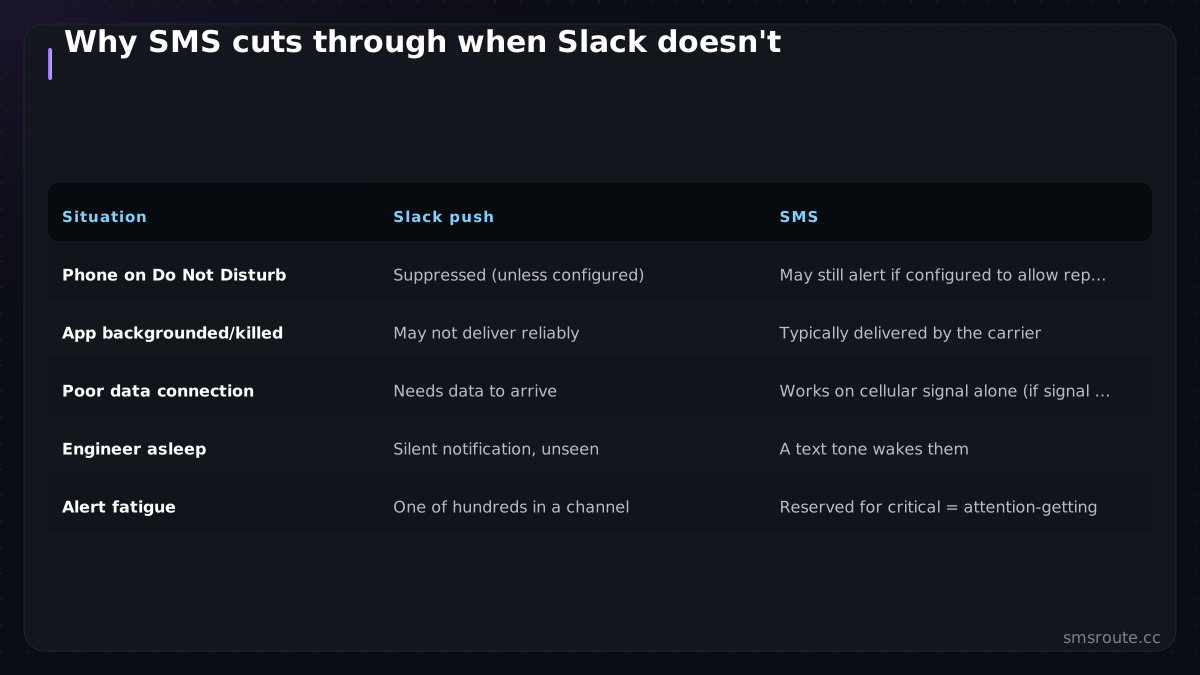
| Situation | Slack push | SMS |
|---|---|---|
| Phone on Do Not Disturb | Suppressed (unless configured) | May still alert if configured to allow repeated calls or SMS from certain contacts |
| App backgrounded/killed | May not deliver reliably | Typically delivered by the carrier |
| Poor data connection | Needs data to arrive | Works on cellular signal alone (if signal is present) |
| Engineer asleep | Silent notification, unseen | A text tone wakes them |
| Alert fatigue | One of hundreds in a channel | Reserved for critical = attention-getting |
The value comes from reserving SMS for the genuinely critical — so a text *means* 'this is the real thing,' and gets the immediate attention a channel message buried among hundreds never will. Scarcity is the feature.
The escalation pattern
- Classify alerts by severityNot everything escalates. Define which alerts are SMS-worthy (production-down, security, revenue-impacting) versus Slack-only (warnings, informational). Getting this line right is the whole design.
- Trigger SMS from the critical pathWhen a critical alert fires — from your monitoring, or a Slack workflow/bot detecting a P1 — send a text to the on-call phone. This can run via a Slack app/webhook to an SMS API or straight from your monitoring system.
- Include what's actionableThe text should say what's wrong and what to do or where to look — enough to act, since the recipient may be responding from a phone, not a laptop. Keep it single-segment and clear. (The GSM-7 160-character segment limit means a short, focused message avoids concatenation and ensures quick delivery.)
- Consider acknowledgement and escalation chainsFor paging, a reply-to-acknowledge (two-way SMS) and escalation to the next on-call if unacknowledged turns SMS alerts into a real paging system — the conversation-flow pattern applied to incidents.
The design rule: SMS is the escalation tier, not the default. Slack handles the volume; SMS handles the critical few that Slack might miss. Send everything to SMS and you've rebuilt the alert-fatigue problem on a channel people can't mute at work — the opposite of what you wanted.
Connecting Slack to SMS
Mechanically, this is a trigger-to-SMS integration: a critical event (detected in Slack, or in the monitoring that feeds Slack) calls an SMS API. You can wire it no-code via a Zapier/Make automation watching for a keyword or a specific alert, or directly from your monitoring system's webhook to an SMS API — the reliability-monitoring stack often already has the hook to send from. For real paging with acknowledgement and escalation, a purpose-built layer or a two-way SMS flow adds the interactivity. (Using a REST API with idempotency keys prevents duplicate alerts from being sent.)
curl -X POST https://api.smsroute.cc/sms/send \
  -H "Authorization: Bearer YOUR_API_KEY" \
  -H "Content-Type: application/json" \
  -d '{
    "to": "+1234567890",
    "from": "YourSenderID",
    "message": "P1: Production down on app-01. Check dashboard."
  }'
SMSRoute is a no-KYC SMS API with crypto billing (BTC, USDT, ETH). The honest framing: we're the SMS API the escalation calls, whether triggered from a Slack workflow, a no-code automation, or your monitoring directly. We are not a Slack app you install. For an on-call setup, point your critical-alert path at our send endpoint. Keep escalation reserved for genuine P1s so the channel stays meaningful. Add reply-to-acknowledge if you want paging semantics. Slack stays your alert home; SMS becomes the tap on the shoulder for the alerts that can't afford to be missed. For anything running in production, that's a gap worth closing. (We support E.164 format for phone numbers and provide delivery receipts (DLR) to confirm message status. For high-volume A2P traffic, consider using a dedicated long code or short code to avoid carrier filtering. According to the GSMA, SMS is the most universal mobile messaging channel, available on every mobile device globally.)
Related reading
FAQ
How do I send SMS alerts from Slack?
Why escalate Slack alerts to SMS?
Should all my alerts go to SMS instead of Slack?
Can I build an on-call paging system with SMS?
Send your first SMS in 5 minutes
No KYC. Pay with BTC, ETH, USDT, XMR, LTC, and SOL. Live routes to 149 countries.
Get an API key →