The spreadsheet is where the contacts already are
For many small teams, the contact list lives in a spreadsheet — not a CRM, not a marketing platform, a Google Sheet. So sending SMS from Google Sheets isn't a hack; it's meeting the data where it is. A row per contact, a column of numbers, a message to send: that maps naturally onto a spreadsheet, and a Sheets-to-SMS workflow lets a non-technical team run appointment reminders, event notices, or a small campaign without exporting anything or learning a new tool. There are two clean ways to build it, and which fits depends on whether you want no-code simplicity or scripting control.
Here are both approaches, when each fits, and the compliance that applies no matter how the texts get sent.
Two ways to send from a sheet
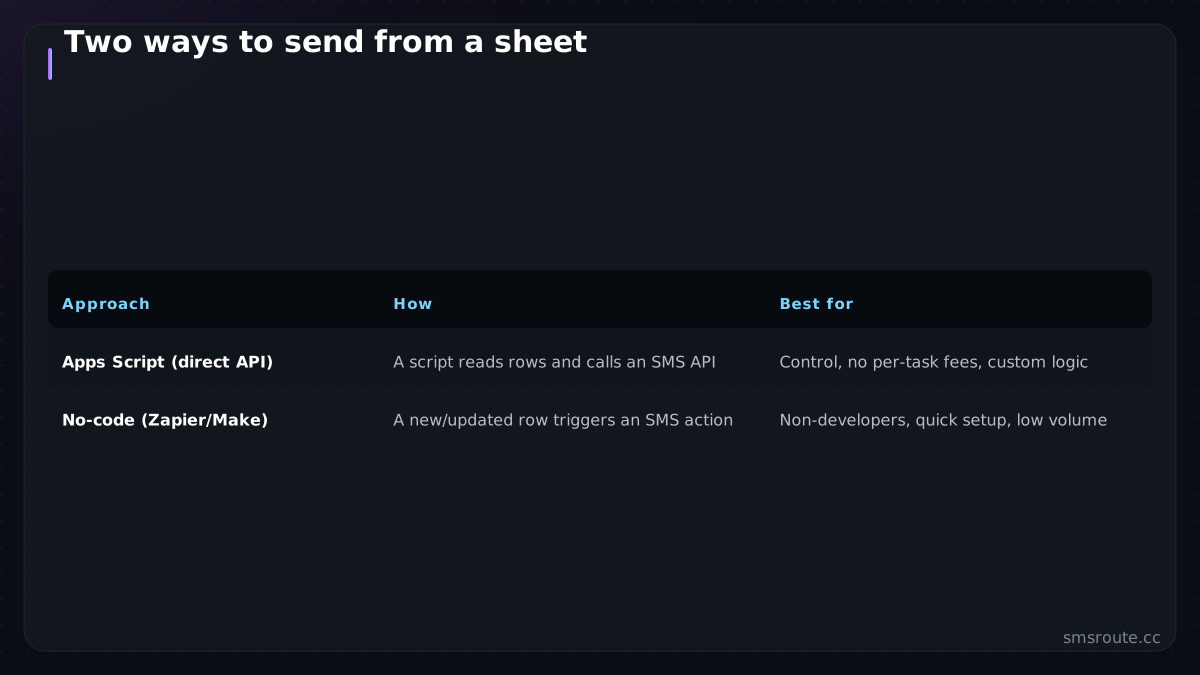
| Approach | How | Best for |
|---|---|---|
| Apps Script (direct API) | A script reads rows and calls an SMS API | Control, no per-task fees, custom logic |
| No-code (Zapier/Make) | A new/updated row triggers an SMS action | Non-developers, quick setup, low volume |
The Apps Script route runs JavaScript inside Google Sheets: the script iterates over rows, pulls the number and message from columns, and calls an SMS API with a normal HTTP request — the same send-with-curl-style call in script form. It has no per-task fees and is fully customizable, at the cost of writing a little code. The no-code route uses Zapier or Make: a new or updated row triggers an SMS action, no scripting, at the cost of per-run pricing. Developers reach for Apps Script; non-technical teams reach for no-code.
curl -X POST https://api.smsroute.cc/sms/send \
  -H "Authorization: Bearer YOUR_API_KEY" \
  -H "Content-Type: application/json" \
  -d '{"to": "+1234567890", "from": "YourBrand", "message": "Your appointment is tomorrow at 10 AM."}'
The bulk-from-spreadsheet pattern
The most common Sheets use is bulk: a column of numbers, send the same or a personalized message to each. Done right, it's a few careful steps; done carelessly, it's an encoding-cost or compliance mess.
- Normalize the number columnPut numbers in E.164 format (or normalize them in the script). Malformed numbers from spreadsheet formatting are the top cause of silent failures — a number that lost its leading + or country code won't route. The ITU-T E.164 recommendation defines the international numbering plan.
- Personalize with merge columnsPull name or other fields from columns into the message, keying content to the row so each person gets the right message — the personalization discipline applied in a sheet.
- Pace the sendsDon't fire the whole column in a tight loop — pace under the provider's rate limit (Apps Script can sleep between calls) so you don't trip throttling or look like a spam burst to carrier firewalls. The CTIA Messaging Principles and Best Practices provide guidelines on messaging practices.
- Write results backLog each send's status (or message id) to a column so you can see what sent, failed, or needs a retry — turning the sheet into a simple send log.
Compliance still applies
A spreadsheet makes bulk sending easy, which makes it easy to bulk-send to people who never consented — the exact thing that gets you in trouble. The channel being a Sheet changes nothing about the rules: you need consent for marketing messages, you must honor opt-outs, and quiet hours apply. The FCC's TCPA rules govern consent requirements for automated text messages. If your sheet is a list you bought or scraped, sending to it isn't a clever workflow, it's a compliance violation waiting to happen. Keep the sheet to genuinely opted-in contacts and track opt-outs in a column so you suppress them.
For developers, Apps Script calling an SMS API directly is the cheapest, most controllable Sheets-to-SMS setup; for a non-technical team, a no-code trigger is simpler. Either way, normalize your numbers, pace the sends, log the results, and only text people who opted in. The spreadsheet is a fine place to run SMS from — as long as it holds a consented list, not just a column of numbers. SMSRoute's published route pages list delivery from $0.004/message (premium direct-carrier corridors up to $0.035) with sub-100ms median submission and ~98.6% delivered success (smsroute.cc route pages, 2026).
Related reading
FAQ
How do I send SMS from Google Sheets?
Can I send bulk SMS from a spreadsheet?
Is it legal to send SMS from a spreadsheet list?
What's the best way to send SMS from Google Sheets for a developer?
Send your first SMS in 5 minutes
No KYC. Pay with BTC, ETH, USDT, XMR, LTC, and SOL. Live routes to 149 countries.
Get an API key →