The point isn't the text — it's the record
Anyone can send a text. The reason to build an SMS CRM integration (putting SMS inside your CRM) is everything around the text: it's logged against the right contact so the whole team sees the conversation history, it's triggered automatically by pipeline events, and when the customer replies, the reply lands back in their record instead of a phone nobody checks. A standalone SMS tool sends messages; a CRM integration makes those messages part of the customer relationship the CRM exists to manage. That's the difference between texting customers and having SMS as a real channel in your sales and support workflow.
This guide covers what a good CRM-SMS integration actually does, and the honest buy-versus-build decision for getting there.
What a real integration does
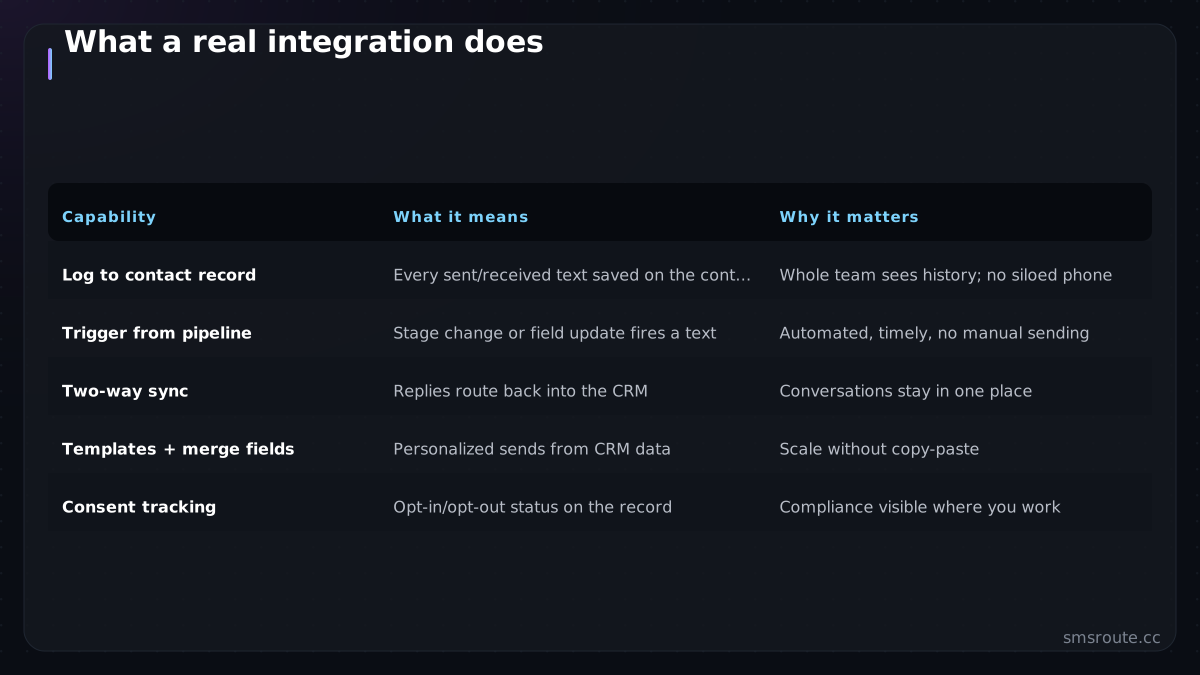
| Capability | What it means | Why it matters |
|---|---|---|
| Log to contact record | Every sent/received text saved on the contact | Whole team sees history; no siloed phone |
| Trigger from pipeline | Stage change or field update fires a text | Automated, timely, no manual sending |
| Two-way sync | Replies route back into the CRM | Conversations stay in one place |
| Templates + merge fields | Personalized sends from CRM data | Scale without copy-paste |
| Consent tracking | Opt-in/opt-out status on the record | Compliance visible where you work |
The two that carry most of the value are logging and triggering. Logging means SMS stops being a black hole — a rep or agent opening a contact sees the texts alongside emails and calls. Triggering means the CRM's automation (a deal reaching 'proposal sent', a ticket closing) fires the right text automatically, turning SMS into part of the workflow rather than a manual chore. Two-way sync closes the loop so replies don't vanish.
Consent lives in the CRM too
A CRM integration is also where SMS compliance becomes visible and enforceable. Consent status belongs on the contact record, so anyone about to text a customer can see whether they opted in — and automated triggers must check it before firing.
- Store opt-in/opt-out on the contact: consent is contact data; keep it where the rep sees it and the automation reads it, with proper opt-in capture.
- Gate triggers on consent: an automated pipeline text must not fire to a contact who hasn't opted in or who opted out; check the flag before sending.
- Sync opt-outs everywhere: a STOP reply must update the CRM record so no future manual or automated send goes out; suppression has to reach the whole system.
- Respect the marketing/transactional line: pipeline nudges may be marketing (needing stronger consent) while a service update may be transactional — the distinction from our compliance checklist applies per message.
Buy a connector or build on an API
- Check for a native/marketplace connector firstMajor CRMs, according to the Salesforce AppExchange and HubSpot marketplace, have SMS apps that handle logging and triggering out of the box. If one fits your CRM and workflow, it's the fastest path — buy, don't build.
- Consider no-code glue for simple needsFor basic 'stage change → send text', a Zapier or Make automation connecting your CRM to an SMS API may be enough, without a full connector.
- Build on an API for control or custom CRMsA custom CRM, unusual workflow, or need for routing/cost control points to building the integration on a direct SMS API — you write the log-to-record and trigger logic, gaining full control.
- Wire two-way sync via webhooksWhichever path, replies come back through the SMS provider's inbound webhook; route them to the matching contact so the conversation stays in the CRM.
SMSRoute is a no-KYC SMS API with crypto billing (BTC, ETH, USDT, XMR, LTC, and SOL), and the honest framing: we'
FAQ
Why integrate SMS with a CRM?
How do I add SMS to Salesforce or HubSpot?
How does consent work in a CRM SMS integration?
Should I buy a CRM SMS connector or build on an API?
Send your first SMS in 5 minutes
No KYC. Pay with BTC, ETH, USDT, XMR, LTC, and SOL. Live routes to 149 countries.
Get an API key →