There isn't one limit — there are two
What are the two SMS character limits?
SMS has two character limits: 160 characters for GSM-7 encoding (standard Latin characters) and 70 characters for UCS-2 (Unicode, e.g., emoji or non-Latin scripts). SMSRoute automatically selects the correct encoding per message, ensuring reliable delivery across 149 countries without manual configuration.
The SMS character limit everyone quotes is 160. It is only half true. That 160 applies to the GSM-7 alphabet, the basic Latin character set defined in 3GPP TS 23.038 (3GPP TS 23.038). The moment your message contains a character outside that set, the whole message switches to UCS-2 (16-bit Unicode) and the limit drops to 70 characters. Not the offending character, but the entire message. One curly quote, one emoji, one accented letter, and your 160-character budget becomes 70.
This is not trivia. Each SMS segment is billed separately, so an encoding you triggered by accident can double or triple the cost of a send. That is a hidden line item behind the per-message rates in our international cost guide.
The numbers, including the concatenation penalty
How does concatenation affect SMS segment billing?
Messages exceeding 160 (GSM-7) or 70 (UCS-2) characters are split into segments. Each segment incurs a 7-byte header overhead, reducing per-segment capacity to 153 (GSM-7) or 67 (UCS-2) characters. SMSRoute's adaptive routing handles concatenation automatically, so you only pay per segment—no hidden fees.
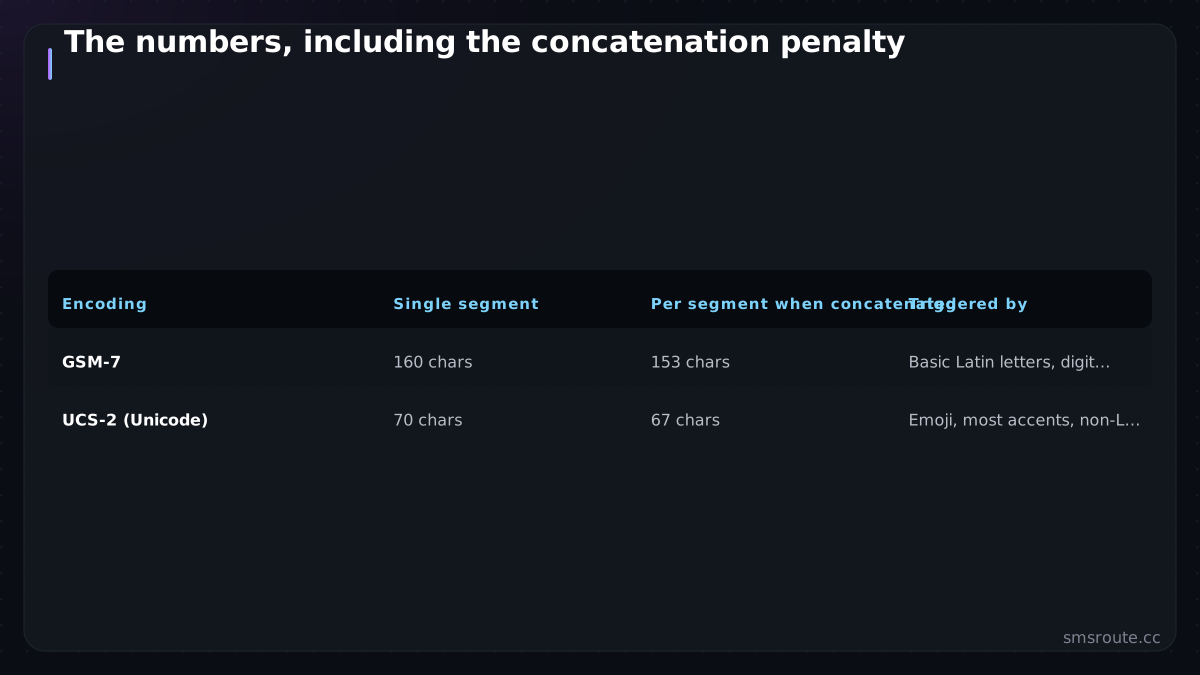
When a message exceeds one segment, it is split and reassembled on the handset — but the split steals characters for header data, so longer messages get *fewer* characters per segment, not more.
| Encoding | Single segment | Per segment when concatenated | Triggered by |
|---|---|---|---|
| GSM-7 | 160 chars | 153 chars | Basic Latin letters, digits, common punctuation |
| UCS-2 (Unicode) | 70 chars | 67 chars | Emoji, most accents, non-Latin scripts, curly quotes |
So a 300-character GSM-7 message is 2 segments (153 + 147). The same message with one emoji becomes UCS-2: 300 characters at 67 per segment is 5 segments. One emoji, 2.5x the cost.
Sneaky UCS-2 triggers hide in plain text: the curly apostrophe from a word processor (’ not '), the en-dash (–), 'smart' quotes, and the degree sign all fall outside GSM-7. Copy-pasting marketing copy from a document is the classic way to silently halve your character budget.
The GSM-7 extension trap
What is the GSM-7 extension trap in SMS?
GSM-7 includes an extension table for characters like caret (^) or curly braces ({ }). Each extension character counts as two characters, reducing your per-segment limit. SMSRoute's API validates message content upfront, helping you avoid unexpected segment counts and keeping costs predictable from $0.004 per message.
A handful of characters are technically in GSM-7 but cost two character slots each, because
they live in an extension table: { } [ ] ( ) ~ | \ ^ €. They keep you in the cheaper GSM-7 encoding
(good), but each eats two of your 160. A message full of curly braces (a code snippet, say) can hit the segment
boundary sooner than its character count suggests.
- Prefer straight quotes and hyphens — ' and - stay in GSM-7; ’ and – force UCS-2.
- Avoid emoji in transactional SMS — beyond the encoding cost, they add nothing to an OTP and can trip content filters.
- Count extension chars as two —
€, brackets, and pipes are GSM-7 but double-width. - Watch non-Latin scripts — Arabic, Chinese, Cyrillic, and Hindi are always UCS-2, so 70/67 is the working limit for those markets by default.
Keeping messages to one segment
How can I keep my SMS within one segment?
To keep messages in one segment, stay within 160 GSM-7 characters (or 70 UCS-2) and avoid extension-table characters. SMSRoute's dashboard shows real-time segment count before sending, and our API includes a validation endpoint. This helps you optimize billing—especially important when sending at scale across 149 countries.
- Detect the encoding before sendingScan the body for any non-GSM-7 character; if present, your limit is 70, not 160. Most SMS libraries expose this. Surface it in your UI so authors see the real count.
- Sanitize copy on the way inReplace curly quotes with straight, em/en-dashes with hyphens, and strip stray Unicode punctuation. This one transform keeps most English copy in GSM-7.
- Write OTP and alerts tightA one-segment OTP is easy: 'YourApp: code 481902, expires in 5 min' is well under 160 GSM-7. Keep the OTP copy pattern single-segment and the WebOTP autofill line budgeted in.
- Show cost, not just charactersDisplay segment count and estimated cost to whoever writes the message. 'This send is 3 segments' stops expensive copy before it goes out.
SMSRoute is a no-KYC SMS API with crypto billing (BTC, ETH, USDT, XMR, LTC, and SOL), and segments are how any SMS API bills (ours included). The deeper arithmetic of splitting, headers, and edge cases is in our dedicated segment math explainer; this page is the practical limit-and-e For example, an edge case is a message containing only a single emoji, which can shift segment boundaries unexpectedly.
Related reading
FAQ
What is the SMS character limit?
Why did my text message split into multiple parts?
Why does one emoji make my SMS more expensive?
How do I keep my SMS to one segment?
Send your first SMS in 5 minutes
No KYC. Pay with BTC, ETH, USDT, XMR, LTC, and SOL. Live routes to 149 countries.
Get an API key →