SmsManager,
which sends a text from the phone's own SIM. The other is a cloud SMS gateway your app calls over HTTPS, which
sends from carrier infrastructure. They solve different problems, cost different things, and Google governs them
differently. Choosing wrong is the cause of most 'why won't my SMS feature ship' headaches.Two different things, one confusing name
Ask for an SMS API on Android and you get two answers that have almost nothing to do with each
other. One is the on-device API: Android's SmsManager, which sends a text from the phone's own SIM.
The other is a cloud SMS gateway your app calls over HTTPS, which sends from carrier infrastructure. They solve
different problems, cost different things, and Google governs them differently. Choosing wrong is the cause of
most 'why won't my SMS feature ship' headaches.
The quick rule: if the message should come from *the user's own phone and number*, that is
SmsManager. If it should come from *your service* to any user, that is a gateway. Almost every
product feature (OTP, alerts, notifications) is the second one.
Side by side
What are the key differences between on-device SmsManager and a cloud SMS gateway?
On-device SmsManager uses the phone's SIM and carrier, limited to one device and local rates. A cloud gateway like SMSRoute offers global coverage (149 countries), crypto billing from $0.004/msg, real-time delivery reports, and automatic failover. SMSRoute requires no KYC and works from any platform via REST API or SMPP.
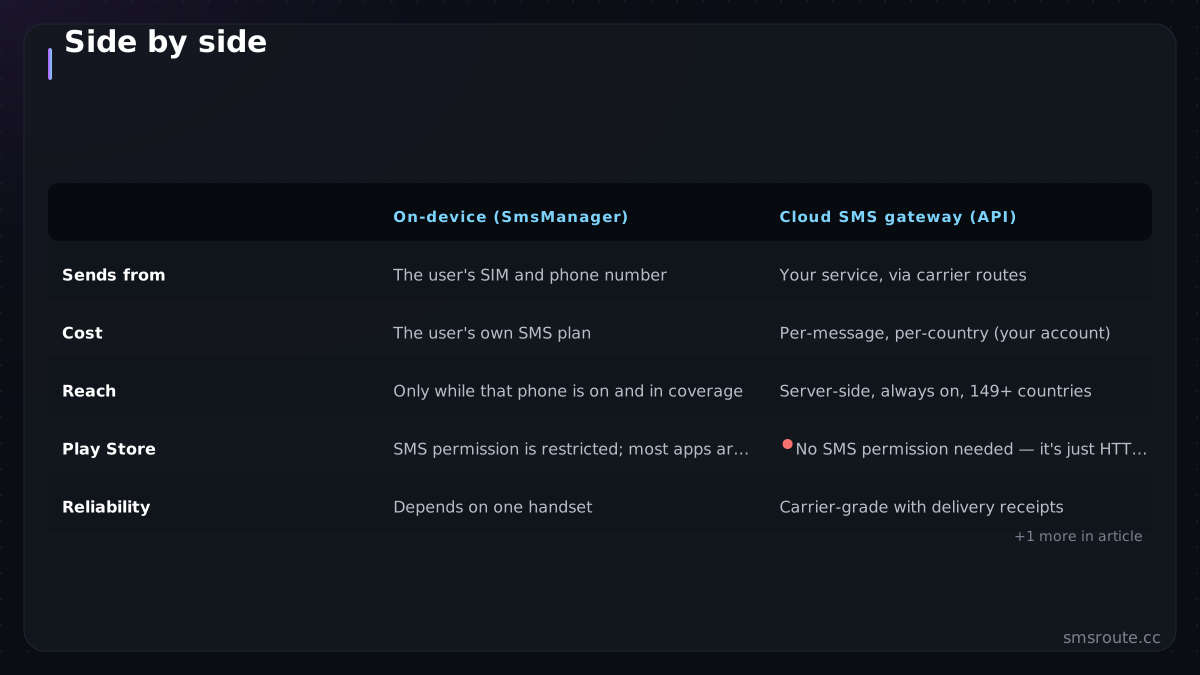
| On-device (SmsManager) | Cloud SMS gateway (API) | |
|---|---|---|
| Sends from | The user's SIM and phone number | Your service, via carrier routes |
| Cost | The user's own SMS plan | Per-message, per-country (your account) |
| Reach | Only while that phone is on and in coverage | Server-side, always on, 149 countries |
| Play Store | SMS permission is restricted; most apps are rejected for requesting it | No SMS permission needed — it's just HTTPS |
| Reliability | Depends on one handset | Carrier-grade with delivery receipts |
| Right for | Default-SMS-handler apps, personal automation | OTP, alerts, any product messaging |
The Play Store row ends most on-device plans. Google restricts the SMS and CALL_LOG permissions to apps whose core function *is* messaging (default SMS handlers). Request SMS permission for a side feature and your app is likely rejected or removed. This alone pushes nearly all product messaging to a gateway. See Google Play's SMS permission policy for details. For example, a flashlight app requesting SMS permission would be rejected because its core function is not messaging.
When on-device is genuinely right
In what scenarios is using on-device SmsManager the better choice?
On-device SmsManager is appropriate for single-user, low-volume, personal apps where the recipient is on the same carrier and no delivery tracking is needed. For any production, multi-user, or global use case, a cloud gateway like SMSRoute provides reliability, scalability, and features like DLR webhooks and multi-route failover.
- You are building an SMS app. A replacement messaging client that is the user's default handler. This is permitted because messaging is the core function.
- Personal automation on your own device. A side-loaded app sending from your own SIM for your own scripts. No Play Store review, no scale ambitions.
- An intentional SMS bridge you control. Turning an old Android phone into a gateway for tiny personal volume. This is the same narrow, honest use case as the modem builds in our self-hosted gateway analysis, with the same carrier-terms caveats.
- Reading incoming SMS for OTP autofill. The WebOTP and SMS Retriever path. A legitimate, permission-scoped way to consume a code without full SMS access.
When you need a gateway (usually)
When should I use a cloud SMS gateway instead of on-device SmsManager?
You need a cloud gateway like SMSRoute when sending to many recipients, requiring delivery reports, or needing global reach. On-device SmsManager is limited to the device's SIM and carrier. SMSRoute covers 149 countries with real-time DLR webhooks, automatic failover, and crypto billing — no KYC required.
If your app sends OTPs, alerts, reminders, or any message that must arrive whether or not a specific phone is on, you need a cloud gateway. It is server-side, so delivery does not depend on the user's handset; it needs no restricted Android permission, so the Play Store is not a problem; and it gives you delivery receipts, retries, and global reach the on-device path cannot.
- Send from your backend, not the appYour server holds the API key and calls the gateway. Never ship an SMS API key inside an Android binary — it will be extracted. Keys live server-side, always.
- Trigger from the app, send from the serverThe app tells your backend 'send the OTP'; the backend calls the SMS API. This is the standard, secure shape.
- Use the same API as any platformA gateway is HTTPS, so it is platform-agnostic — the Node.js or any-language integration on your server works identically for Android, iOS, and web clients.
- Handle delivery and autofillReconcile delivery receipts server-side, and format OTP messages for Android autofill so users never leave your screen.
SMSRoute is a no-KYC SMS API with crypto billing (BTC, ETH, USDT, XMR, LTC, and SOL) — a cloud gateway your
Android backend calls over HTTPS, no SMS permission, first message in minutes via the 5-line integration. For product messaging on Android, that
server-side path is almost always the answer; save SmsManager for the rare case where the message
truly must come from the user's own phone. For how this market fits the wider picture, see the global SMS compliance map. SMSRoute's published route pages
list delivery from $0.004/message (premium direct-carrier corridors up to $0.035) with sub-100ms median
submission and ~98.6% delivered success (smsroute.cc route pages, 2026).
Related reading
FAQ
How do I send SMS from an Android app?
Why does Google reject my app for using SmsManager?
Should I use SmsManager or an SMS API for OTP?
Can I turn an old Android phone into an SMS gateway?
Send your first SMS in 5 minutes
How fast can I start sending SMS with a cloud API?
With SMSRoute, you can send your first message in under 5 minutes. Sign up with just an email (no KYC), fund your account with crypto (BTC, ETH, USDT, XMR, LTC, SOL), get your API key, and send. Free test credits are provided on signup to verify routes before funding.
No KYC. Pay with BTC, ETH, USDT, XMR, LTC, and SOL. Live routes to 149 countries.
Get an API key →