Where SMPP errors live: command_status
Where do SMPP errors appear in the protocol?
SMPP errors are reported in the command_status field of every response PDU. This 4-byte integer indicates success (0x00000000) or a specific failure reason. SMSRoute's API automatically interprets these codes and provides real-time delivery reports, so you never have to decode raw hex values manually.
If you're binding to an SMSC over SMPP, every response PDU carries the answer to 'did that work?' in one place: the 4-byte command_status field. Zero (0x00000000) means success; any non-zero value is an error. So reading SMPP error codes correctly starts with knowing the field exists and that its value is a hex code you look up, not a message you can eyeball. This matters because SMPP is a binary protocol used for high-throughput sending (the Kannel setup is the on-ramp), and at volume, handling command_status wrong means silently dropping or duplicating thousands of messages.
The good news: a handful of codes account for most of what you'll actually see, and they fall into a predictable structure. Learn those and the long reference tables become lookups rather than study.
The error-code structure and the common ones
What is the structure of SMPP error codes and which ones are most common?
SMPP error codes are 4-byte hex values grouped by category: network (0x00000001-0x000000FF), bind (0x00000100-0x000001FF), submit (0x00000200-0x000002FF), and delivery (0x00000300+). Common ones include ESME_RINVSYSID (0x00000003) and ESME_RINVPASWD (0x00000007). SMSRoute's dashboard logs every code with plain-English explanations.
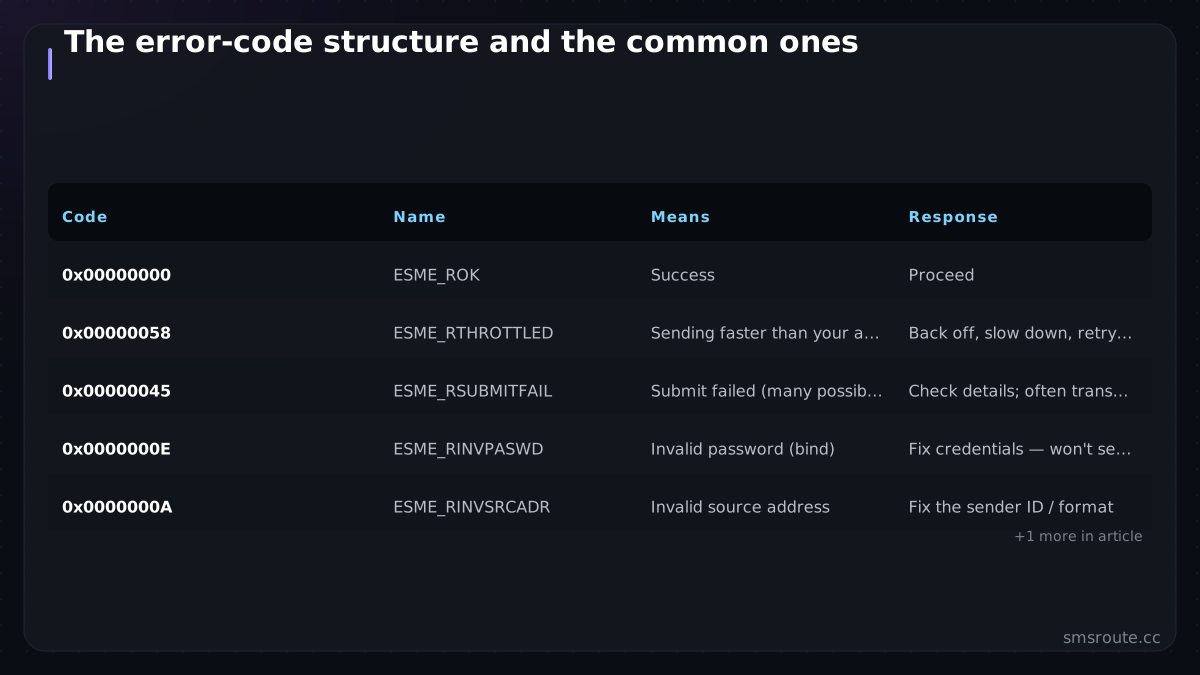
command_status values are organized into ranges, per the SMPP specification SMPP v5.0 specification: 0x0001-0x00FF for standard protocol errors, 0x0100-0x03FF for extended-spec errors, and 0x0400 and above for vendor-specific ones. That last range is why you always keep your provider's error reference handy — vendors define their own codes above 0x0400.
| Code | Name | Means | Response |
|---|---|---|---|
| 0x00000000 | ESME_ROK | Success | Proceed |
| 0x00000058 | ESME_RTHROTTLED | Sending faster than your allowed rate | Back off, slow down, retry with delay |
| 0x00000045 | ESME_RSUBMITFAIL | Submit failed (many possible causes) | Check details; often transient, retry carefully |
| 0x0000000E | ESME_RINVPASWD | Invalid password (bind) | Fix credentials — won't self-resolve |
| 0x0000000A | ESME_RINVSRCADR | Invalid source address | Fix the sender ID / format |
| 0x0000000B | ESME_RINVDSTADR | Invalid destination address | Validate the recipient number |
The two you'll meet most: ESME_RTHROTTLED (0x58) means you're exceeding your rate — the fix is client-side rate limiting and backoff, not retrying harder. ESME_RSUBMITFAIL (0x45) is a catch-all submit failure with many underlying causes, so it needs investigation rather than a blind retry. Common underlying causes include an invalid message format, an expired or unreachable destination, or a network timeout during submission.
Bind failures: the errors before you send anything
What SMPP errors occur during bind and how do I fix them?
Bind failures happen before any message is sent. Common codes: ESME_RINVSYSID (invalid system ID), ESME_RINVPASWD (wrong password), ESME_RBINDFAIL (system unavailable). With SMSRoute, you get instant bind confirmation via API response and 24/7 support to resolve any credential issues within minutes.
Before any message goes out, you have to bind. And bind failures are their own category because they stop you cold. If your bind is rejected, the cause is almost always one of a short list, none of which retrying will fix without a change on your side.
- Wrong system_id or password: the credentials are incorrect (ESME_RINVPASWD). Verify them.
- IP not whitelisted: the SMSC allows binds only from approved IPs; yours isn't on the list. This is a common surprise from a new server.
- Account disabled or expired: a provider-side account issue, not a code issue.
- Maximum concurrent binds exceeded: you're already bound the maximum number of times; close stale binds or request a higher limit.
- Wrong SMPP port: connecting to the wrong port entirely; check the provider's connection details.
Because bind failures are configuration problems, the fix is never 'retry in a loop'. That just hammers the SMSC and can get you rate-limited or blocked. Diagnose the specific cause, correct it, then bind.
Responding to errors the right way
How should I properly respond to SMPP error codes?
Always check command_status before proceeding. For transient errors (e.g., ESME_RMSGQFUL), retry with exponential backoff. For permanent errors (e.g., ESME_RINVDSTADR), fix the parameter. SMSRoute's adaptive routing automatically retries failed messages across multiple carriers, and undelivered messages are credited back to your balance.
- Read command_status on every responseNever assume success. Check the 4-byte field on each PDU; zero is success, anything else is an error to classify.
- Throttling → back off, don't hammerESME_RTHROTTLED means slow down. Implement rate limiting and exponential backoff in your SMPP client; retrying immediately makes it worse.
- Bind errors → fix config, then bindCredentials, IP allowlist, port, bind limits — diagnose the specific cause rather than looping. A retry loop on a bad bind is a self-inflicted outage.
- Submit failures → investigate, retry carefullyESME_RSUBMITFAIL has many causes; log the context, and where it's transient, retry with idempotency awareness so you don't duplicate on the message that actually went out.
SMSRoute is a no-KYC SMS API with crypto billing (BTC, ETH, USDT, XMR, LTC, and SOL) and supports SMPP binds for high-throughput sending alongside its REST API. Whichever you use, the discipline is the same one the three-level error handling describes at the HTTP layer, expressed in SMPP's binary form: read the status on every response, classify the error, back off on throttling, fix configuration on bind failures, and retry transient submit errors carefully. Do that and SMPP's raw throughput comes without the silent-drop and duplicate risks that catch teams treating command_status as an afterthought.
SMSRoute's published route pages list delivery from $0.004/message (premium direct-carrier corridors up to $0.035) with sub-100ms median submission and ~98.6% delivered success (smsroute.cc route pages, 2026).
Related reading
FAQ
Where are SMPP error codes found?
What does ESME_RTHROTTLED mean?
What causes an SMPP bind to fail?
What is ESME_RSUBMITFAIL?
Send your first SMS in 5 minutes
No KYC. Pay with BTC, ETH, USDT, XMR, LTC, and SOL. Live routes to 149 countries.
Get an API key →