One command, first message
How do I send my first SMS with curl?
With SMSRoute, send your first SMS in one curl command. Sign up with just an email (no KYC), fund with crypto, get your API key, then run: curl -X POST https://api.smsroute.cc/send -H 'Authorization: Bearer YOUR_KEY' -d 'to=+1234567890&text=Hello'. Your message routes instantly to 149 countries.
The fastest way to send SMS with curl — and to prove your key works — is one command from a terminal. Before you pick a language, install an SDK, or write a line of application code, this shows you exactly what the API expects and what it returns, with nothing in between. It's the truest quickstart: no framework, no abstraction, just the raw HTTP request the API is built on. Once this works, every language tutorial is just this same request expressed in that language's HTTP client.
curl -X POST https://api.smsroute.cc/sms/send \
  -H "Authorization: Bearer $SMSROUTE_KEY" \
  -H "Content-Type: application/json" \
  -d '{"to": "+15551234567", "from": "MyApp", "message": "Hello from curl"}'
That's the whole thing. Export your key (export SMSROUTE_KEY=...), run it, and a text goes out.
Swap the URL and auth header for any provider and the shape is identical — this is the universal skeleton of an
SMS send.
Every flag, explained
What curl flags do I need to send an SMS?
Key curl flags for SMSRoute: -X POST for the API endpoint, -H for your Authorization header with Bearer token, and -d for data parameters like 'to' (recipient number), 'text' (message), and optional 'sender_id'. No complex setup. Just these three flags get your message delivered globally.
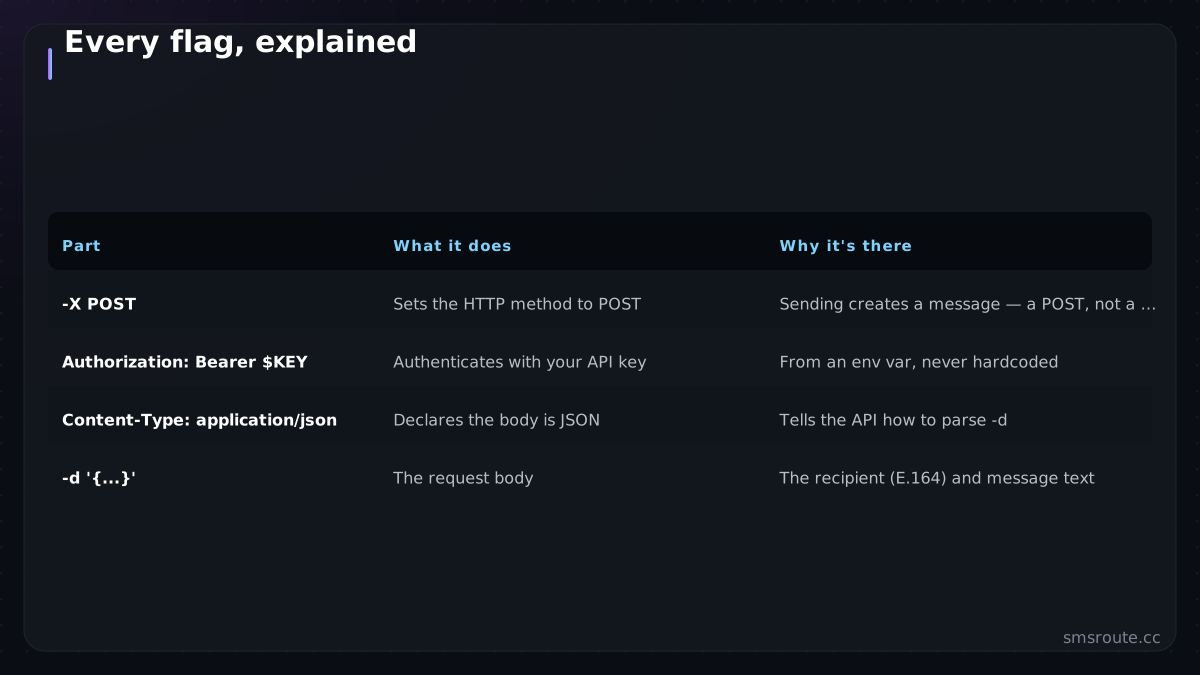
| Part | What it does | Why it's there |
|---|---|---|
| -X POST | Sets the HTTP method to POST | Sending creates a message: a POST, not a GET |
| Authorization: Bearer $KEY | Authenticates with your API key | From an env var, never hardcoded |
| Content-Type: application/json | Declares the body is JSON | Tells the API how to parse -d |
| -d '{...}' | The request body | The recipient (E.164) and message text |
The key comes from an environment variable ($SMSROUTE_KEY), never typed into the command
literally. The same discipline keeps it out of source code. And the recipient number is in E.164 format (+ and country code), because that's
what the API routes on.
Reading the response
How do I read the SMS API response from curl?
SMSRoute returns a JSON response with 'status' (success/fail), 'message_id' for tracking, and 'cost' in USD. Example: {"status":"success","message_id":"abc123","cost":0.004}. Use the message_id to check delivery reports via real-time DLR webhooks or dashboard logs.
The API answers with JSON, and reading it correctly is the second half of the lesson. The response tells you what happened, and a 200 doesn't mean what beginners think.
{"id": "msg_a1b2c3", "status": "queued"}idis the message id. Store it; it's how you'll reconcile the delivery receipt later.status: queuedmeans the provider accepted the message. It does NOT mean delivered. That's the level-two-vs-level-three distinction, true even from curl.- An error response (a 4xx with a reason like bad number, auth, or balance) means fix the request; a 5xx means retry. curl shows you the raw status and body to diagnose.
- Add
-i. curl's-iflag prints the HTTP status line and headers, so you see the real response code, not just the body.
From curl to production
How do I move from curl to production SMS sending?
Transition from curl to production with SMSRoute's REST API and SMPP binds. Integrate using our Python, PHP, Go, or Node.js code examples on GitHub (SMSRoute-cc). Scale with automatic multi-route failover, real-time DLR webhooks, and 99.9% uptime. All while keeping your crypto billing and no-KYC simplicity.
curl is the perfect first step and a terrible production tool — it has no retries, no idempotency, no delivery reconciliation. Once the command works, you've validated your key, the endpoint, the request shape, and the response format, and you graduate to real code that adds the reliability curl lacks.
- Prove it with curlGet the one command sending and reading the response. Now you know the API works and exactly what it expects — the fastest possible validation.
- Move to your languageTranslate the same request into your stack's HTTP client — Node, Go, PHP, or any other. It's the identical POST.
- Add the reliability curl skipsRetries, idempotency keys, and delivery reconciliation — the production patterns curl has none of.
- Keep curl for debuggingIt stays useful forever as the quickest way to test the API in isolation when something's wrong in your app.
SMSRoute is a no-KYC SMS API with crypto billing (BTC, ETH, USDT, XMR, LTC, and SOL), and this curl command is genuinely all it takes to send your first message — with the $5 signup credit, it costs nothing to try. Run it, see the text arrive, read the response, and you understand the API completely — then build the production version with the retries and reconciliation that turn this one command into a system you can rely on. SMSRoute's published route pages list delivery from $0.004/message (premium direct-carrier corridors up to $0.035) with sub-100ms median submission and ~98.6% delivered success (smsroute.cc route pages, 2026). The E.164 format is defined by the International Telecommunication Union in ITU-T Recommendation E.164.
Related reading
FAQ
How do I send an SMS with curl?
Does a 'queued' response from curl mean the SMS was delivered?
Why use curl to test an SMS API?
Should I use curl to send SMS in production?
Send your first SMS in 5 minutes
No KYC. Pay with BTC, ETH, USDT, XMR, LTC, and SOL. Live routes to 149 countries.
Get an API key →