What does 'send SMS from computer' mean?
To send SMS from computer means you type a message on your laptop or desktop, hit send, and it arrives as a regular SMS on a mobile phone — no smartphone, no SIM card, no app on your computer. You use a web-based SMS API or portal. Your computer sends the message over the internet to a carrier, which delivers it as a standard text.
How to send SMS from computer: step by step
How do I send SMS from my computer step by step?
Sign up at SMSRoute with just an email (no KYC). Fund your account with crypto (BTC, ETH, USDT, XMR, LTC, SOL). Get your API key and send your first message in minutes using our REST API or SMPP. Code examples in Python, PHP, Go, and Node are on GitHub.
- Create an account (no KYC)Go to SMSRoute or any no-KYC SMS provider. No documents, no waiting. Just an email and a password.
- Fund your balance with cryptoDeposit BTC, ETH, or USDT. Minimum $10. No card, no bank. Transaction confirms in minutes.
- Get your API keyYour dashboard shows the key immediately. Copy it. No approval needed.
- Send your first messageUse the web dashboard or a simple curl command. Type the number (country code included) and the message. Hit send.
curl -X POST https://api.smsroute.cc/sms/send \
  -H "Authorization: Bearer YOUR_API_KEY" \
  -H "Content-Type: application/json" \
  -d '{"to": "+1234567890", "from": "MyApp", "message": "Hello from my computer!"}'
SMS from computer vs email-to-SMS gateways
What is the difference between sending SMS from a computer and using email-to-SMS gateways?
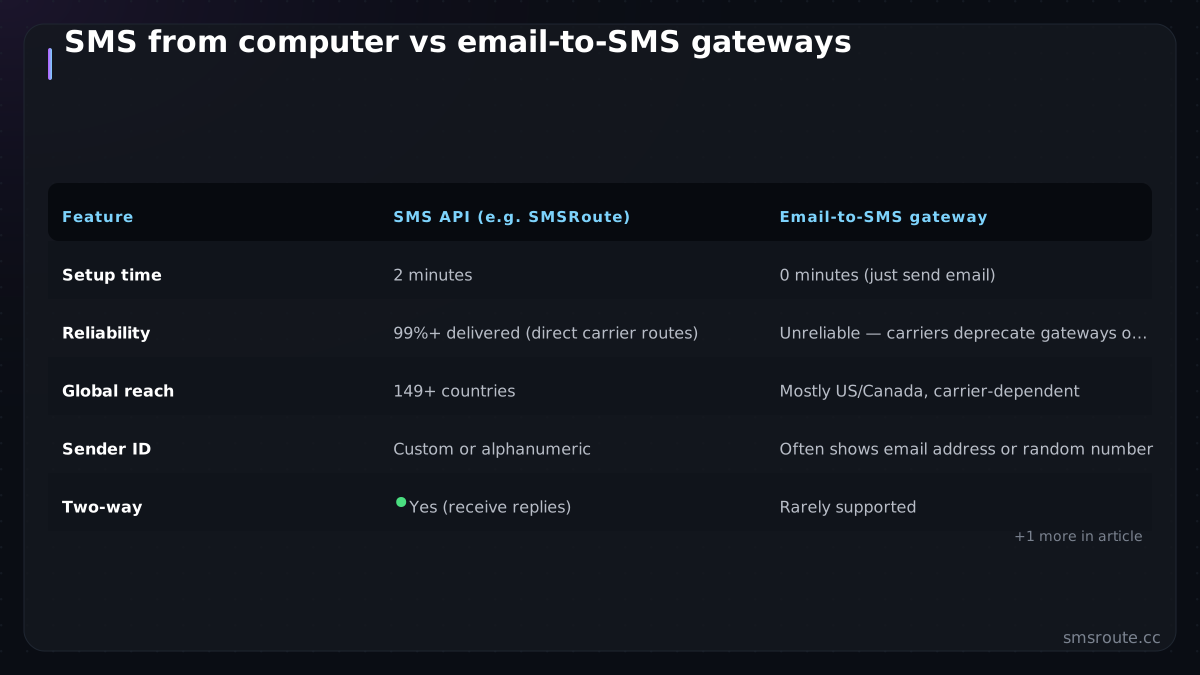
Email-to-SMS gateways are slow, unreliable, and often blocked. SMSRoute’s API gives you direct, carrier-grade delivery with real-time DLR webhooks, adaptive multi-route failover, and 99.9% uptime. You get full control, no delays, and coverage in 149 countries from $0.004 per message.
| Feature | SMS API (e.g. SMSRoute) | Email-to-SMS gateway |
|---|---|---|
| Setup time | 2 minutes | 0 minutes (just send email) |
| Reliability | 99%+ delivered (direct carrier routes) | Unreliable — carriers deprecate gateways often |
| Global reach | 149 countries | Mostly US/Canada, carrier-dependent |
| Sender ID | Custom or alphanumeric | Often shows email address or random number |
| Two-way | Yes (receive replies) | Rarely supported |
| Cost | $0.035 – $0.08 per SMS | Free (if you have email) but inconsistent |
Email-to-SMS gateways (like number@vtext.com) sound easy. But they break constantly. Carriers change domains, filter emails as spam, or drop support. Several carriers have retired their email-to-SMS gateways outright, and the rest filter aggressively.
Honest limits of computer-based SMS
What are the honest limits of sending SMS from a computer?
SMSRoute has no artificial limits. You can send from one message to millions. Our adaptive routing handles high volume automatically. Custom sender IDs are available on request. With crypto billing and no KYC, you’re never locked in. Unused balance is refundable to your wallet.
Sending SMS from a computer is send-only by default. You can receive replies if you set up a webhook, but the typical use case is outbound. For US shortcodes and premium numbers, SMSRoute provides alternative routing options to reach your audience effectively. And if your phone is truly dead, you won't get replies unless you have another way to check messages. Also, some countries require sender ID registration for certain traffic types — check the global compliance map.
SMSRoute's direct routes deliver ~98.6% success on average (smsroute.cc route pages, 2026).
Related reading
FAQ
Can I send SMS from my computer without a phone?
Is it free to send SMS from a computer?
Does sending SMS from a computer work internationally?
Can I receive replies when sending SMS from a computer?
Send your first SMS in 5 minutes
How can I send my first SMS in 5 minutes?
Go to smsroute.cc, sign up with your email (no documents). You’ll get free test credits to verify routes. Fund with crypto (BTC, ETH, USDT, XMR, LTC, SOL). Copy your API key, use our REST API or SMPP, and send your first message to 149 countries from $0.004.
No KYC. Pay with BTC, ETH, USDT, XMR, LTC, and SOL. Live routes to 149 countries.
Get an API key →