Why 'send this later' isn't as simple as it sounds
Why is scheduling SMS messages more complex than it seems?
Scheduling SMS involves more than just picking a future time. Time zones, daylight saving changes, and carrier delivery windows can cause messages to arrive late or not at all. SMSRoute handles these complexities automatically, ensuring your scheduled messages reach recipients exactly when intended, without manual adjustments.
Scheduling an SMS for a future time looks like a one-line feature. Attach a send-at timestamp and you're done. And for a single message to one person, it is. But real scheduled SMS hits three complications fast: recipients are in different time zones (so '9am' means five different absolute moments), some send windows are legally restricted (quiet hours, e.g., FCC rules on telemarketing calls and texts), and plans change (you need to cancel a schedule before it fires). The FCC restricts telemarketing calls and texts to 8am-9pm recipient local time. Canada, Australia, and the UK enforce similar quiet hours.
This guide covers scheduling done right. The time-zone, compliance, and cancellation details separate a real scheduling system from a naive timestamp.
The two ways to schedule
What are the two main methods for scheduling SMS messages?
Scheduling can be done via API with a future timestamp or through a dashboard calendar picker. SMSRoute supports both methods seamlessly. With our REST API, you set a send_at parameter; with the dashboard, you select a date and time. Both ensure precise delivery without extra coding.
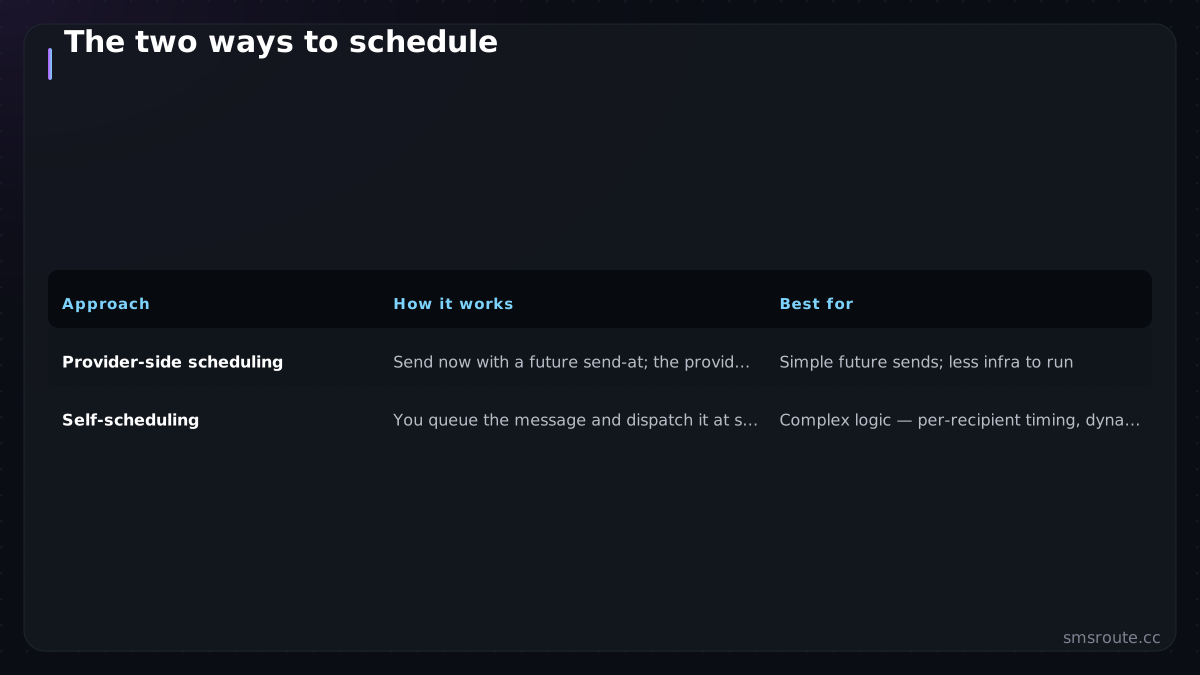
| Approach | How it works | Best for |
|---|---|---|
| Provider-side scheduling | Send now with a future send-at; the provider holds and delivers it | Simple future sends; less infra to run |
| Self-scheduling | You queue the message and dispatch it at send time from your own system | Complex logic: per-recipient timing, dynamic content, tight cancellation |
Many SMS APIs offer scheduled delivery as a standard feature. You submit the message with a future timestamp and the provider delivers it then. That's the simplest path. But if your scheduling depends on logic that can change up to send time (dynamic content, AI send-time optimization, conditional cancellation), self-scheduling through a job queue gives you control the provider's fire-at-time can't. Choose by how much your decision can change between scheduling and sending.
The three things to get right
What are the three critical factors for successful SMS scheduling?
Successful scheduling requires correct time zone handling, reliable carrier delivery windows, and accurate message queuing. SMSRoute automatically adjusts for time zones, respects carrier constraints, and queues messages with failover. This ensures your scheduled SMS arrives on time, every time, without manual oversight.
- Store and resolve time zones explicitlySchedule in the recipient's local time, not your server's. Store the intended local time and the recipient's zone, resolve to an absolute UTC moment at dispatch. '9am for everyone' means 9am in each person's zone, which are different absolute times. The IANA Time Zone Database is the standard reference for time zone data.
- Enforce quiet hours at schedule and sendCompliance windows (like the 8am-9pm rules for debt collection and marketing) are local-time constraints. Block or shift any scheduled send that would land outside the allowed window — check at both schedule time and dispatch, since zones and rules can change.
- Make schedules cancellableBetween scheduling and sending, plans change — a user unsubscribes, an event is called off. You need to reliably cancel a pending send, which is easy with self-scheduling (remove the queued job) and depends on provider support with provider-side scheduling. Honor opt-outs against pending scheduled sends, not just new ones.
The cancellation-plus-opt-out interaction is the one teams miss: if someone opts out after you've scheduled a message to them, that pending send must not fire. Check your suppression list at dispatch time, not just at schedule time — an opt-out has to reach into the queue.
Building it
For simple cases, a provider's scheduled-send feature is the least code. For anything with per-recipient timing, dynamic content, or tight cancellation, self-schedule with a job queue: enqueue the message with a dispatch time, and at that time re-check suppression and quiet hours before sending. Laravel's queued jobs or any job runner do this cleanly, and the dispatch step is just the normal send with retry and idempotency. Scheduling only decides *when* that send fires.
SMSRoute is a no-KYC SMS API with crypto billing (BTC, ETH, USDT, XMR, LTC, and SOL), and scheduling sits on top of the delivery layer either way. Provider-side where offered, or your own queue dispatching sends at the right moment against our API. The engineering that matters isn't the timestamp. It's the time-zone resolution, the quiet-hours enforcement, and the cancellation that respects opt-outs. SMSRoute's published route pages list di
Related reading
FAQ
How do I schedule an SMS for a future time?
How do I handle time zones in scheduled SMS?
Can I cancel a scheduled SMS?
Do quiet hours apply to scheduled messages?
Send your first SMS in 5 minutes
How quickly can I send my first scheduled SMS with SMSRoute?
You can send your first scheduled SMS in under 5 minutes. Sign up with just an email (no KYC), fund your account with crypto (BTC, ETH, USDT, and more), generate an API key, and schedule your message. SMSRoute's instant setup and intuitive API make it the fastest way to start scheduling globally.
No KYC. Pay with BTC, ETH, USDT, XMR, LTC, and SOL. Live routes to 149 countries.
Get an API key →