What 'verifying' actually means
What does 'verifying' mean in RCS?
When RCS shows 'verifying,' your carrier is checking if your device and network support the protocol. This step can stall due to carrier restrictions or incomplete setup. SMSRoute offers a reliable alternative: send messages instantly to 149 countries with no verification delays, using our no-KYC API and crypto billing.
If your messaging app is stuck on RCS trying to verify your phone number, here's what's happening. RCS (Rich Communication Services) has to confirm your number with the carrier and Google's RCS service before it can turn on the rich features. That confirmation usually happens quietly in the background. But sometimes it stalls: the app shows 'verifying' or 'setting up' and never completes. For the authoritative reference, see the GSMA RCS Universal Profile. For example, the profile specifies a default verification timeout of 300 seconds and a maximum of three retry attempts before the session is terminated.
Here's why RCS verification gets stuck, the fixes that usually work, and why SMS keeps you covered underneath.
Why it gets stuck
Why does RCS get stuck on 'verifying'?
RCS verification stalls when carriers lack full support, your device isn't configured correctly, or network settings block the handshake. Instead of troubleshooting endlessly, switch to SMSRoute's SMS API. We deliver messages in minutes to 149 countries with 99.9% uptime, no KYC, and automatic failover. No verification hurdles.
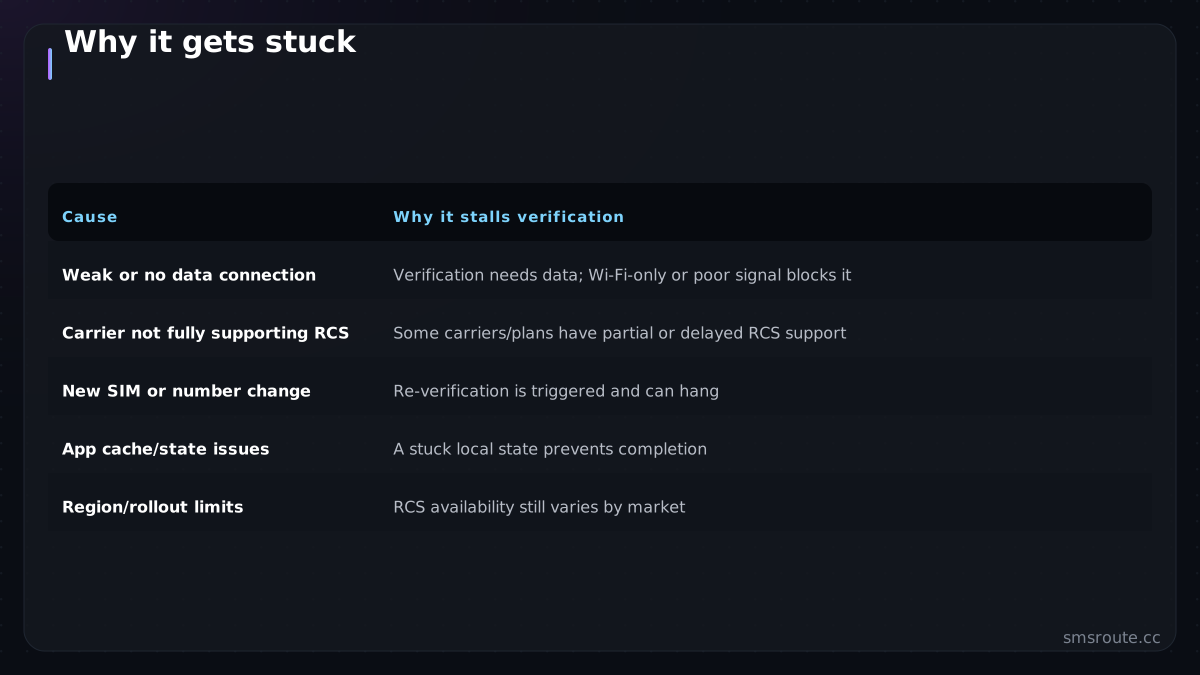
| Cause | Why it stalls verification |
|---|---|
| Weak or no data connection | Verification needs data; Wi-Fi-only or poor signal blocks it |
| Carrier not fully supporting RCS | Some carriers/plans have partial or delayed RCS support |
| New SIM or number change | Re-verification is triggered and can hang |
| App cache/state issues | A stuck local state prevents completion |
| Region/rollout limits | RCS availability still varies by market |
The most common cause is connectivity: RCS verification needs a working mobile data connection, so a phone on Wi-Fi with mobile data off, or on a weak signal, often can't complete it. Carrier support is the next culprit — RCS rollout still varies by carrier and region, so some numbers just can't verify yet. And a SIM swap or number change re-triggers verification, which sometimes hangs on old app state. None of these are your fault, and none stop your regular texts.
How to fix it
How do I fix RCS stuck on 'verifying'?
Try restarting your device, updating carrier services, or clearing Messages app cache. If it persists, your carrier may not support RCS fully. SMSRoute bypasses this entirely: our SMS API works on any network, with real-time delivery reports and crypto billing. Start sending in minutes, not hours.
- Check mobile dataEnsure mobile data is on (not just Wi-Fi) with a decent signal. Verification runs over the cellular data connection, so this fixes the most common case.
- Restart and waitToggle airplane mode or restart the phone, then give it time. Verification can take a while, and a network reconnect often nudges it through.
- Clear the messaging app cacheIn Android settings, clear the cache (not data) for your messages app to reset a stuck local state, then reopen it.
- Toggle RCS off and onIn the messages app chat settings, turn RCS/chat features off, restart, then turn it back on to re-trigger a clean verification.
- Check carrier supportIf it still won't verify, your carrier or plan may not fully support RCS yet. That's outside your control, and SMS continues working regardless.
The reassuring part: while RCS is stuck verifying, your messages don't fail. They fall back to SMS. You keep sending and receiving texts as normal; you just don't get the rich RCS features until verification completes. So there's no urgency-panic here, just an annoyance to work through.
Why SMS is the reason it's not a crisis
Why is SMS a reliable alternative when RCS is stuck?
SMS works universally on all carriers and devices, unlike RCS which depends on carrier support. SMSRoute's API ensures instant delivery to 149 countries with 99.9% uptime, adaptive routing, and real-time DLRs. No verification delays, no carrier restrictions. Just reliable messaging from $0.004 per message.
The fact that RCS verification can hang while your texts keep flowing illustrates something important about how messaging works: SMS is the universal fallback beneath the rich channels. RCS is designed to degrade to SMS whenever it can't be used. No signal, no support, or stuck verifying means you're never actually cut off. This is the same reason businesses keep SMS as their base layer: it works when the fancier channel doesn't. Our RCS vs WhatsApp explainer and SMS-vs-RCS comparison both make this point.
If you're a business rather than a consumer here: this is exactly why you don't build critical flows on RCS alone. A verification code or urgent alert sent only over RCS would fail for every user stuck exactly as you might be right now. SMSRoute is a no-KYC SMS API with crypto billing (BTC, ETH, USDT, XMR, LTC, and SOL) that provides that reliable SMS base. It's the layer that works whether or not a recipient's RCS ever finishes verifying. For consumers, the takeaway is simpler: try the fixes above, and know your texts are fine in the meantime. RCS is a nice upgrade when it works, and SMS is why it never leaves you stranded.
Related reading
FAQ
Why is my RCS stuck on 'verifying'?
How do I fix RCS verification that won't complete?
Do my texts still work if RCS won't verify?
Should businesses rely on RCS for verification codes?
Send your first SMS in 5 minutes
No KYC. Pay with BTC, ETH, USDT, XMR, LTC, and SOL. Live routes to 149 countries.
Get an API key →