*123#**. This USSD shortcut returns your
registration status on Globe, Smart/TNT, and (for most functions) DITO without an app or internet connection.
Under the SIM Registration Act (RA 11934), every SIM must be tied to a verified identity, and unregistered SIMs
get deactivated — so this is a check worth doing before it becomes a problem. For the authoritative reference,
see A2P 10DLC registration.The fastest check: one code, all networks
To check SIM registration status in the Philippines, the quickest route works on every
network: dial ***123#**. This USSD shortcut returns your registration status on Globe, Smart/TNT,
and (for most functions) DITO without an app or internet connection. Under the SIM Registration Act (RA 11934),
every SIM must be tied to a verified identity, and unregistered SIMs get deactivated — so this is a check worth
doing before it becomes a problem. For the authoritative reference, see A2P 10DLC registration.
If the USSD result is unclear or you prefer an app, each carrier offers its own method. They all answer the same question: is this SIM Registered or Not Registered?
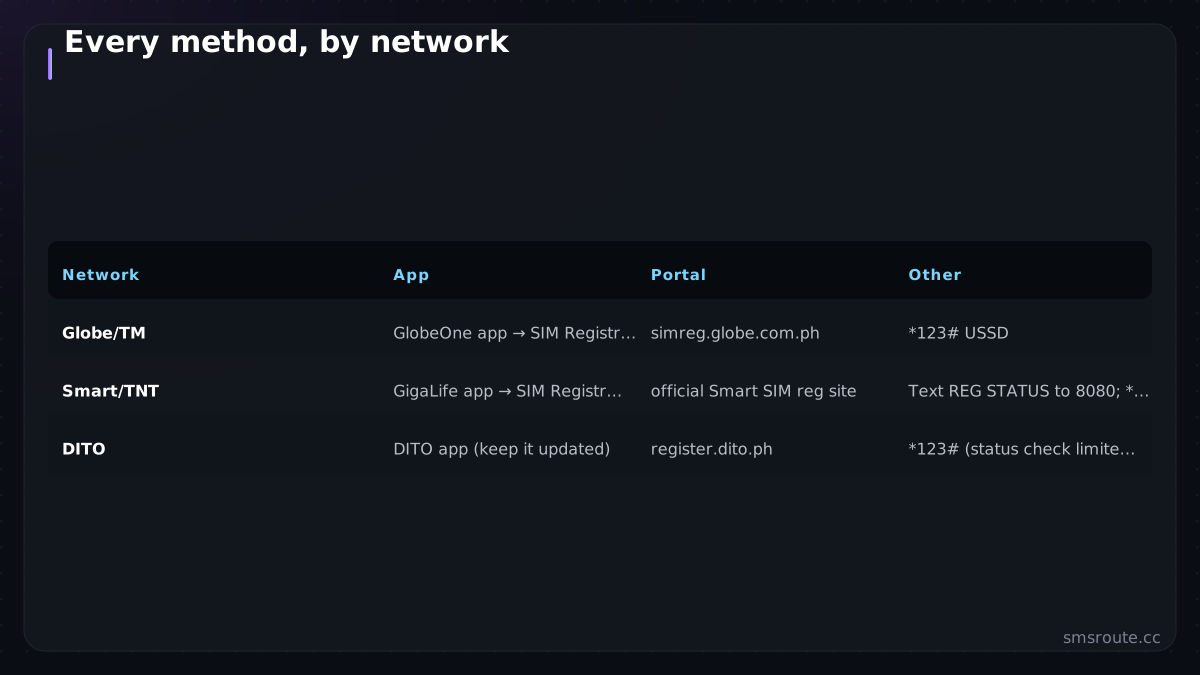
Every method, by network
| Network | App | Portal | Other |
|---|---|---|---|
| Globe/TM | GlobeOne app → SIM Registration Status | simreg.globe.com.ph | *123# USSD |
| Smart/TNT | GigaLife app → SIM Registration Status | official Smart SIM reg site | Text REG STATUS to 8080; *888; *123# |
| DITO | DITO app (keep it updated) | register.dito.ph | *123# (status check limited) |
One safety note that matters here: SIM registration attracts scam sites. Use only the carriers' official apps and domains above. A page asking for your full ID details on an unfamiliar URL is the exact phishing this very law was meant to reduce — do not hand your identity documents to a lookalike.
Why registration status affects the messages you receive
This is not only a personal admin task. It has a direct line to whether services can reach you. An unregistered SIM is deactivated, which means it stops receiving *everything*, including the OTP codes banks, apps, and logins send. If your verification texts suddenly stop arriving, an unregistered or deactivated SIM is a prime suspect before you blame the sender.
- OTPs silently fail to a deactivated SIM. The sender sees a delivery failure; you see nothing arrive.
- Re-registration restores delivery. Once the SIM is active again, message flow resumes normally.
- Number changes break saved OTP destinations. If you replaced a deactivated SIM with a new number, update it everywhere you use SMS verification.
For businesses sending to Philippine users, the flip side matters: a portion of any Philippine list will be deactivated SIMs. Pre-send number validation strips them so you are not paying to message dead numbers. The same list-hygiene logic applies as in our HLR lookup guide.
For senders: what this means operationally
If you send SMS *into* the Philippines rather than just checking your own SIM, the registration regime shapes your delivery in two ways. Your reachable audience is the registered-SIM base, so expect some historical numbers to be dead. The country's mandatory sender-ID rules stack on top. The full operational picture is in our Philippines SMS guide.
SMSRoute is a no-KYC SMS API with crypto billing (BTC, ETH, USDT, XMR, LTC, and SOL) serving the international route to Globe and Smart. For reaching Philippine users, validate numbers first to skip deactivated SIMs. Design for the generic sender by putting your app name in the message body (OTP copy pattern). Test delivery to SIMs you control before scaling. This empirical check is what our delivery benchmark method describes. Filtering and registration make the Philippines a market where testing first genuinely pays. SMSRoute's published route pages list delivery from $0.004/message (premium direct-carrier corridors up to $0.035) with sub-100ms median submission and ~98.6% delivered success (smsr).
Related reading
FAQ
How do I check if my SIM is registered in the Philippines?
What happens if my SIM is not registered?
Why are my OTP codes not arriving in the Philippines?
How does SIM registration affect businesses sending SMS to the Philippines?
Send your first SMS in 5 minutes
No KYC. Pay with BTC, ETH, USDT, XMR, LTC, and SOL. Live routes to 149 countries.
Get an API key →